Review and delete unmapped records
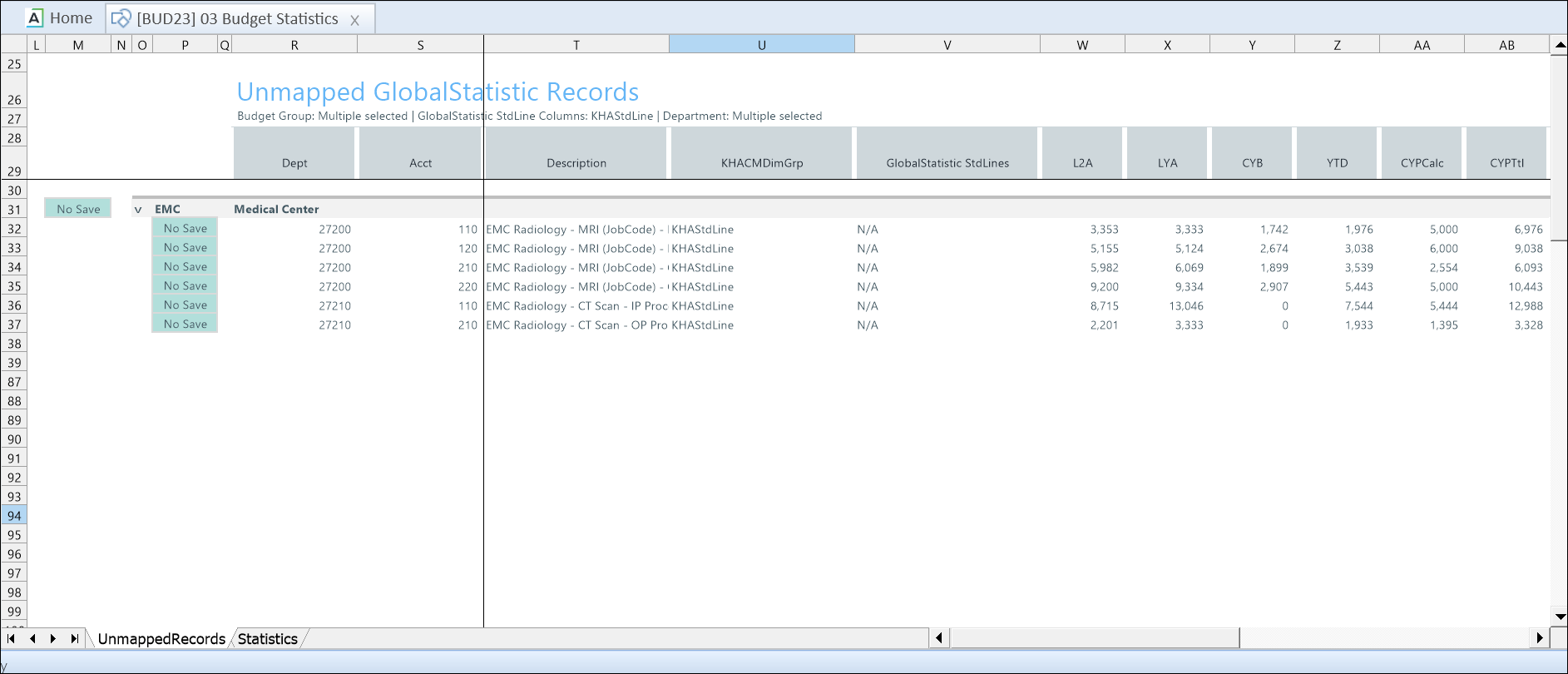
The Unmapped Records tab in the 03 Budget Statistics driver displays records that are no longer mapped to the GlobalStatistic calculation method.
Records become unmapped when the standard line (StdLine) for an account in the ACCT dimension is changed from GlobalStatistic to another calculation method. These records remain in the underlying table and are set to No Save by default.
Unmapped records can affect summary totals on the Budget Statistics tab. If not removed, they may cause totals (such as Patient Days or Discharges) to be overstated because they still reflect previously saved values.
NOTE: Previous to the 2025.4 release, users could manually assign a calculation method other than GlobalStatistic. After the release enhancement records not set to GlobalStatistic were no longer visible, but remained in Budget Group data. The Unmapped Records tab provides a way to review and delete these records to prevent hidden data from blocking Budget Group deletion or reappearing in future cycles.
Delete an unmapped record
-
Click No Save in the line item.
-
Click the down arrow and select Delete.
NOTE: Deleting an unmapped record also deletes all subordinate records.
-
To save, right click the 03 Budget Statistics tab and select Save > Save Data Only.
Delete all unmapped records in a budget group
-
Click No Save to the left of the budget group header.
-
Click the down arrow and select Delete.
NOTE: Deleting unmapped records also deletes all subordinate records.
-
To save, right click the 03 Budget Statistics tab and select Save > Save Data Only.
This table describes the columns in the Unmapped Records tab.
| Column | Description |
|---|---|
| Dept | Dept number or code (cost center) |
| Acct | Statistic account number |
| KHACMDimGrp | A calculation method that assigns standard line behavior based on a department grouping (DEPT.KHACMDimGrp) instead of the account standard line. If not used, the system defaults to KHAStdLine. |
| GlobalStatistic StdLines | Shows whether the account is mapped to a standard line with the GlobalStatistic calculation method. N/A indicates that no GlobalStatistic standard line is assigned and the record requires review. |
| L2A | Actual value from two fiscal years ago |
| LYA | Actual value from the prior fiscal year |
| CYB | Budgeted value for the current fiscal year |
| YTD | Actual value recorded so far for this fiscal year. |
| CYPCalc | Current year projected (calculated) |
| CYPTtl | Total projected value for the current fiscal year |
| ChgPct | The percentage change used to adjust the statistic when calculating the next year budget. |
| AnnualInput | The starting annual number before it is spread across months. |
| NYBTtl | The total budgeted statistic for next year. |
| Comments | Enter comments for the line item. |
| Spread Method | The rule that controls how an annual amount is distributed across time periods. |
| NYB1-NYB12 |
The monthly breakdown of the next year budget total, where: NYB1= the first month of the fiscal year NYB12 = the last month of the fiscal year |
| Spread Tag | The rule that controls how an annual amount is distributed across time periods. |
Budget Statistics configuration includes the following tasks:
